Client feedback on your live Framer site, not on the canvas
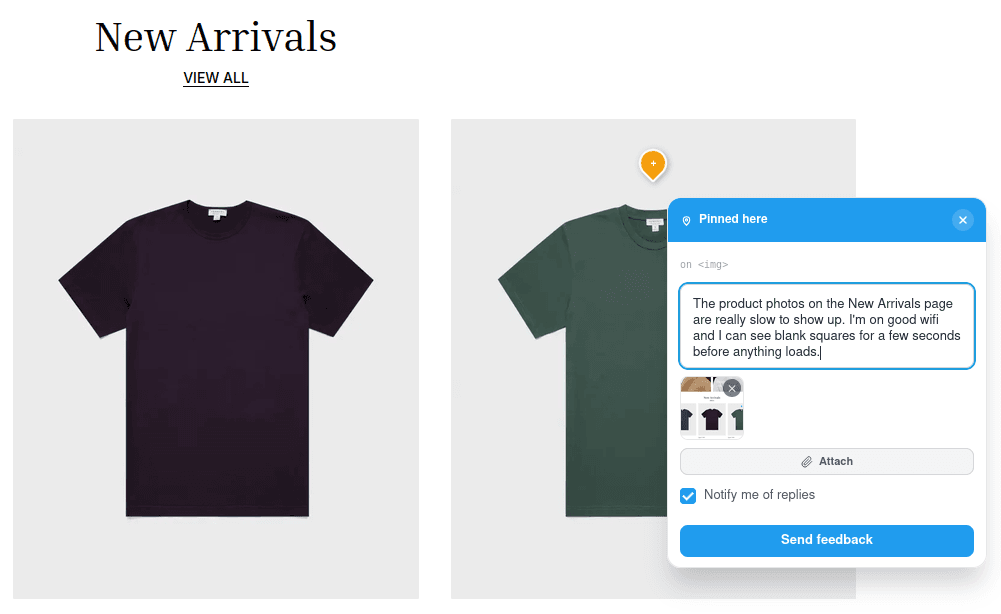
Your clients pin comments straight onto the published page, and every report arrives with a screenshot and the technical details you need. No Framer seat, no account, no extension.
Framer is built for designing, not for client reviews
Framer collaboration is great inside your team. Once the client gets involved, feedback scatters across email, Slack and calls.
Comments live on the canvas
Framer's built-in comments sit in the editor, on the design. Your client is reviewing the published site: real fonts, real load times, real breakpoints. That is where their feedback belongs.
Clients need project access
To comment in Framer, a client has to be invited into the project. Most clients will not learn an editor to tell you a heading is too big. They send a screenshot in an email instead.
Feedback without context
"The button is broken" on which page, which browser, which screen size? Without that, every report starts with a round of questions before anyone can fix anything.
Live on your Framer site in three steps
One script tag. Nothing to install in Framer, nothing for your client to install.
- 1
Create a project in VibeVaults
Add your client's Framer site URL. The free framer.website address works fine for staging.
- 2
Paste the snippet into Framer
Open Site Settings, then Code, and paste the snippet into the End of <body> field. Custom code is available on every Framer plan, including the free one.
- 3
Publish and invite your client
Custom code runs on the published site, not in the canvas preview, so publish once. VibeVaults detects the widget, and you send your client one review link.
<script src="https://www.vibe-vaults.com/widget.js" data-key="YOUR_PROJECT_KEY" async></script>Everything a feedback round needs
Pinned to the exact spot
Clients click anywhere on the live page and drop a pin. Pins stay attached to the element as the layout reflows across breakpoints.
Context captured automatically
Every report carries a screenshot, the page URL, browser, OS, viewport, recent console logs and failed network requests.
A real-time thread per pin
Reply on the spot and move each report from open to in progress, in review and completed, so clients stop asking whether it was fixed.
One review link, no account
Clients enter a name and email and they are in. No Framer seat, no signup, no browser extension.
Invisible to visitors
Only people you invited, or who opened the site through your review link, see the widget. Your client's customers never do, so it can stay on a live site.
Follows Framer's page changes
Framer switches pages without a full reload. The widget follows along, and each page, including CMS item pages, shows only its own pins.
Pay per plan, never per reviewer
Invite as many client reviewers as each project needs, at no extra cost. Plans differ in how many projects and team members they include.
Starter
For freelancers getting started
- 1 workspace
- 3 projects
- 2 team members
- Unlimited feedback & clients
- Real-time chat
- VibeVaults branding on widget
Pro
For growing teams and agencies
- 3 workspaces
- 10 projects
- 10 team members
- Unlimited feedback & clients
- Real-time chat
- Team collaboration & role-based access
- Public dashboard for stakeholders
- No branding on widget
Business
For agencies at scale
- Everything in Pro
- Unlimited workspaces
- Unlimited projects
- Unlimited team members
- Priority support
14-day free trial · No credit card required
- Daily backups
- 200+ automated tests on every release
- Uptime monitored 24/7
- Data hosted in the EU
- GDPR-ready, DPA included
VibeVaults for Framer FAQ
Does VibeVaults work on Framer's free plan?
Yes. Framer allows custom code on every plan, including the free one, and VibeVaults only needs one script tag. You can collect feedback on a free framer.website staging site before the client pays for hosting.
Do my clients need a Framer account or seat?
No. Clients open your review link, enter their name and email, and leave feedback on the published site. They never touch the Framer editor, so you never pay for a seat for them.
How is this different from Framer's built-in comments?
Framer's comments are for people working inside the project and point at the design on the canvas. VibeVaults collects feedback on the published site, from clients who are not in the project, and attaches a screenshot, browser details, console logs and failed requests to every report.
Will site visitors see the widget?
No. The widget is only visible to people you invited and to those who opened the site through your shareable review link. Everyone else sees your site as usual, so the widget can stay installed after launch for ongoing feedback.
Does it slow down my Framer site?
The script loads asynchronously, so it does not block your page from rendering, and for ordinary visitors it stays hidden.
Where do I paste the code in Framer?
Open Site Settings, then Code, and paste the snippet into the End of <body> field. Save and publish. The snippet applies to every page of the site.
How much does it cost?
Every plan starts with a 14-day free trial, no credit card required. Client reviewers and feedback are unlimited on every plan, so inviting more people to review never changes your bill. Plans differ in how many projects (client sites) and team members they include.
Run your next Framer feedback round on the live site
14-day free trial. No credit card. Works on Framer's free plan.